Mac 的设置和软件 2018岁末版(2020.3更新)
Table of Contents
过几年换电脑就做一次,由于上一份工作不常用 Mac,需要安装一系列的东东,还挺折腾的,所以记录一下
MBP,iMac,iPhone,已经很普遍了,不像 10~20 年前,那是高大上的东西,现在网上各种相关资料很多。几大块,顺序不重要。工具和软件很多,把基本的先搞定。
键盘 & 鼠标 #
不得不吐槽,Apple 家的我极不习惯(用过至少两代了),键盘换成了 K1 Bluetooth:low profile,无线,低噪声,原生 Mac 布键(可以切换至 Windows),18 种酷炫夜光模式
2020 更新:K1 价廉物美,就是不耐操,疫情在家一年下来,电池很快掉电,键盘不灵敏了,几个常用键需要大力敲几次,MX Keys 已经替换上场:
鼠标换成了 Logi MX Master3(已升级到 3s, 8000dpi),而且可以通过 Logi 的软件进行定制:
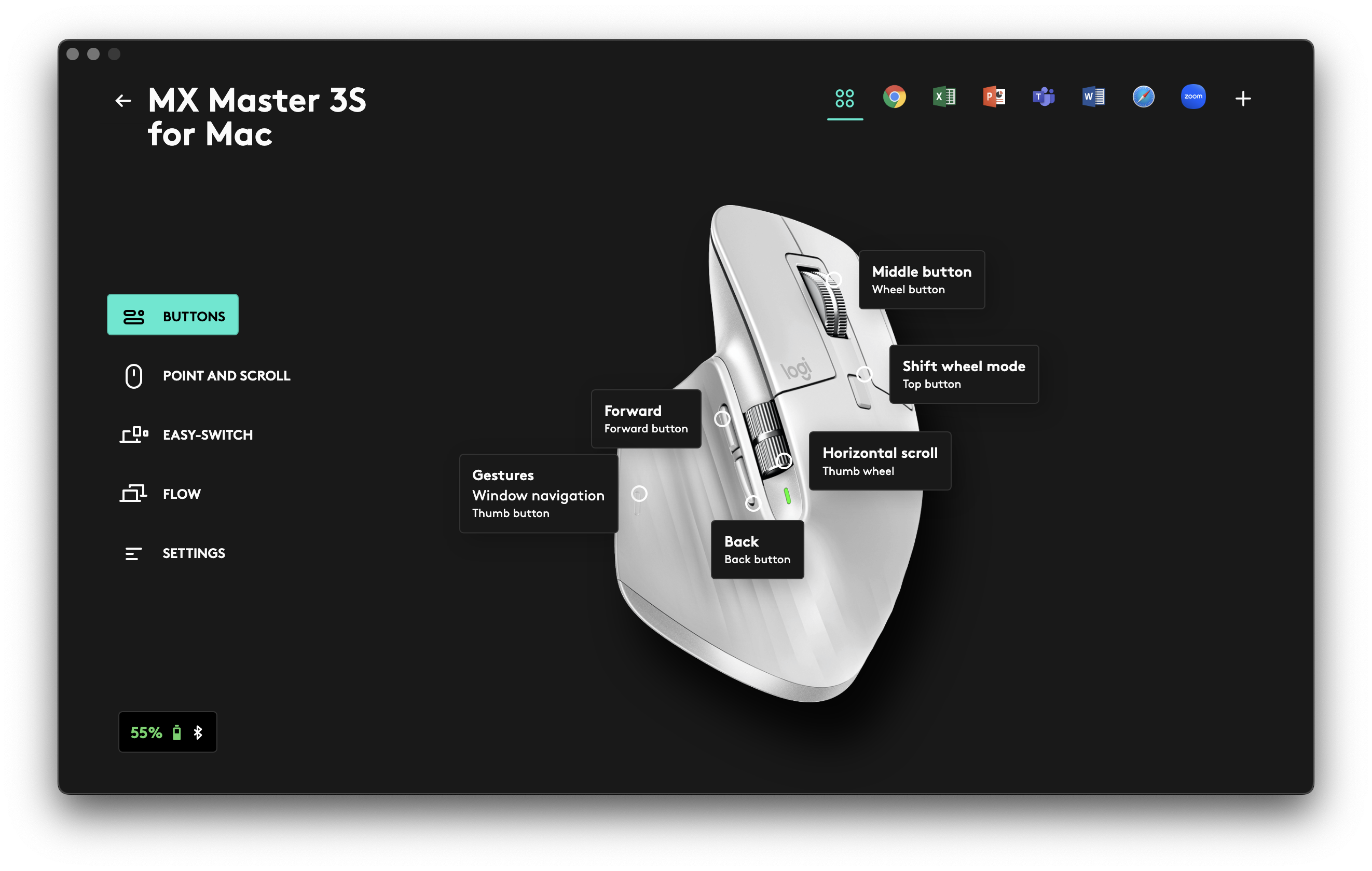
Mac 上的好鼠标太少,此前的用过两个雷神的 DeathAdder,基本寿命就是两年,手感,响应准确度等均弱于 MX Master3
以上两个东西性价比极好,体验超级丝滑,网评可以看一波,至今我非常满意 。
电脑座椅绝对值得投入,有钱直接 aeron 不用考虑:

MacOS 基本配置 #
System Preference #
Keyboard #
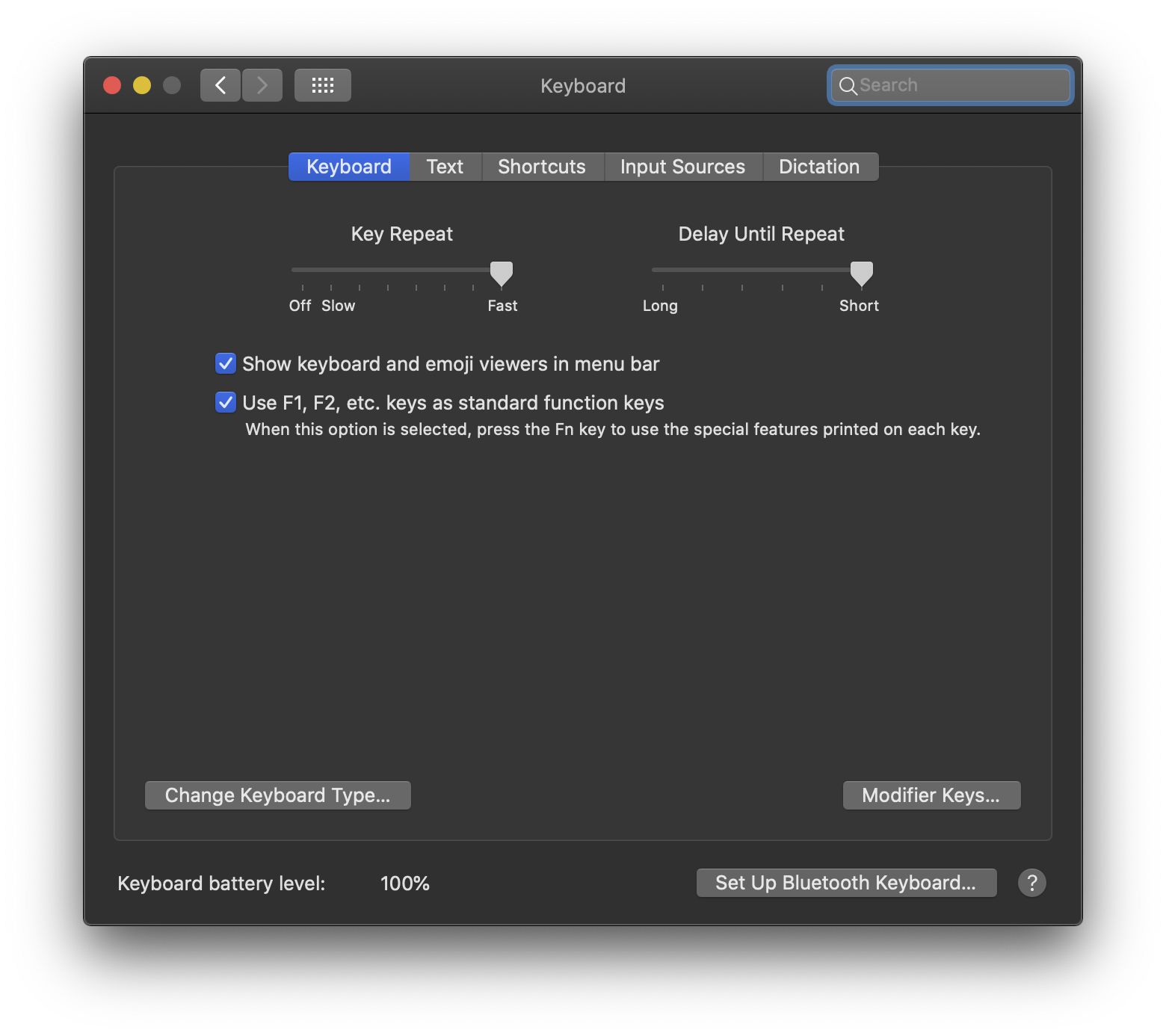
功能键 Fn:默认情况下,F1-F12 都是特殊功能,比如调节屏幕亮度。而当你需要键入 F1-F12 时需要同时按住 Fn,这对于开发人员来说是非常不方便的。将 F1-F12 改成标准功能键。
键盘控制:上图里选 Shortcuts,然后 ✅ User keyboard navigation to move focus between controls
Caps 切换输入法
Dock #
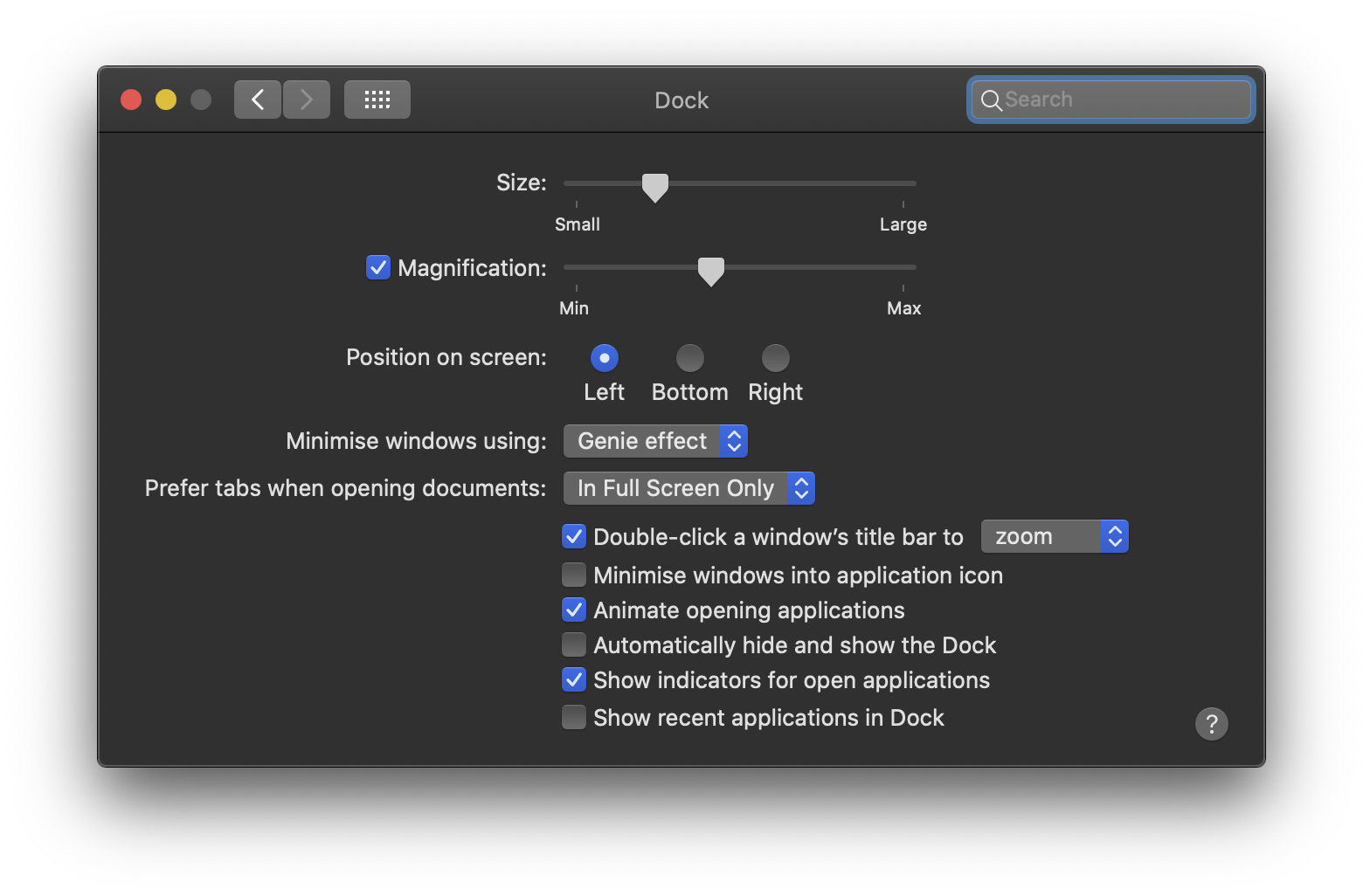
hot conners: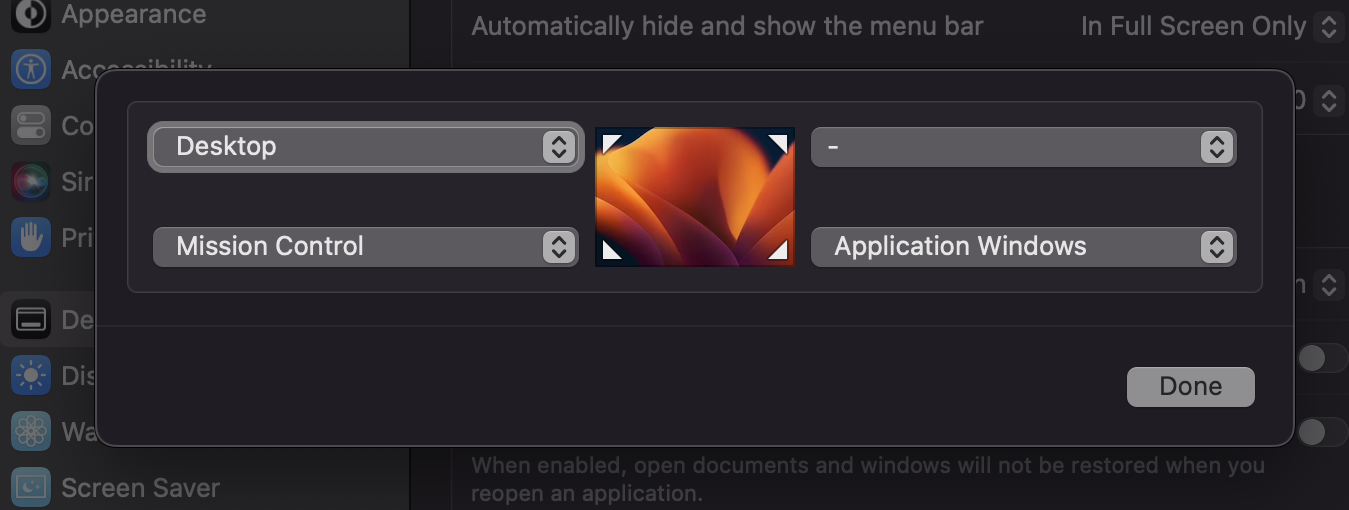
Finder #
Finder → Preference → Advanced: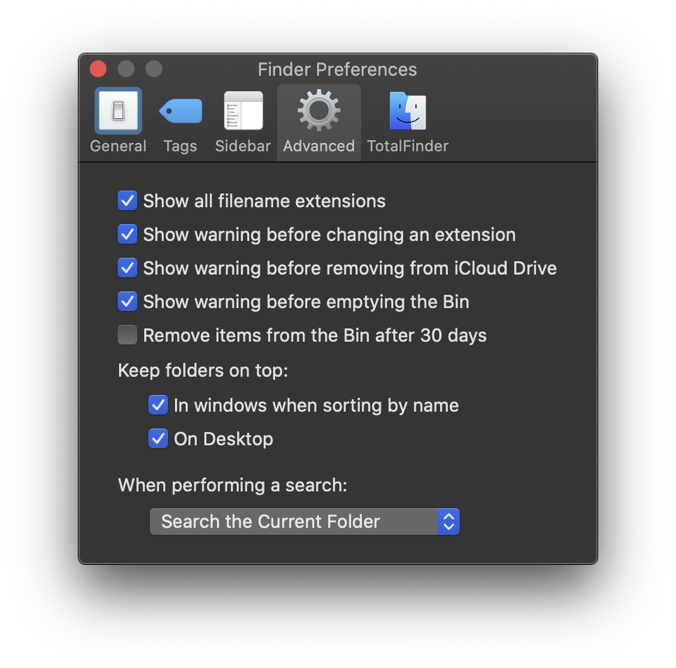
Finder → View → Show View Options: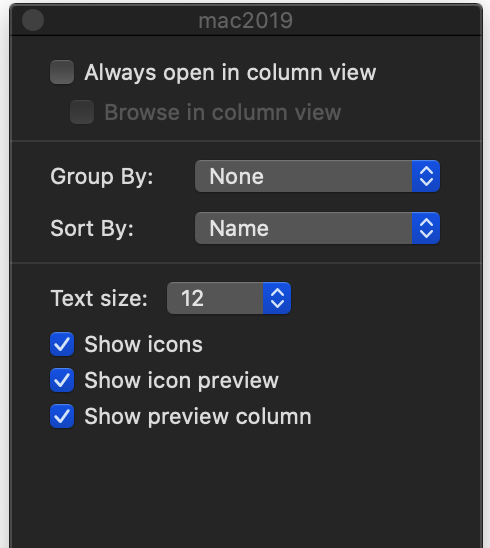
其它 #
macOS 默认只允许运行通过苹果应用商店下载的软件。macOS 如果想安装第三方应用需要到 Preference/系统偏好设置 > Security & Privacy/安全性与隐私 > General/通用 中开启,Allow apps downloaded from:🔘 Anywhere
Disable SIP(System Integrity Protection)
需要重启 Mac 进入 Recovery 模式(开机时同时按下 ⌘ R)
$ csrutil disable
$ reboot
重启后查看 SIP:
$ csrutil status
System Integrity Protection status: disabled
Disable Gatekeeper
macOS 如果想安装第三方未签名的应用需要在终端中执行命令行:
sudo spctl --master-disable
显示隐藏文件
希望在 Finder 里看到这个目录的内容
# show Library folder
chflags nohidden ~/Library

# show hidden files
defaults write com.apple.finder AppleShowAllFiles YES

# show path bar
defaults write com.apple.finder ShowPathbar -bool true

# show status bar
defaults write com.apple.finder ShowStatusBar -bool true

$ defaults write com.apple.finder _FXShowPosixPathInTitle true
$ killall Finder
screenshot
默认情况下,macOS Mojave 将屏幕截图存储在 Mac 的桌面上。现在,如果您启用了 iCloud 同步,那么它会不断上传到您的帐户。这是不安全的,也很占空间。
$ defaults write com.apple.screencapture location ~/Downloads
$ defaults write com.apple.screencapture type jpg
$ killall SystemUIServer
每次截图自带阴影效果,可以关闭或开启:
关闭
$ defaults write com.apple.screencapture disable-shadow -bool true; killall SystemUIServer
开启
$ defaults write com.apple.screencapture disable-shadow -bool false; killall SystemUIServer
其它很多设置,根据自己的喜好可以网上参考一番。
iTune/Music.app
Account → Authorizations → Authorize This Computer
软件 #
网上都有盗版或破解,需要花点时间找。Apple 的 MacOS 源自 Unix,但其自带系统软件难用,一二十年毫无大进步,和微软的 Windows 的用户体验差距不小,好在是第三方挺给力。
必备工具 #
| 必备工具 |
|---|
| Amphetamine:防止进入睡眠状态,定时休眠 |
| fastzip:压缩/解压缩 |
| CleanMyMac,Lemon:垃圾清理,软件卸载,系统优化 |
| Hidden Bar:菜单栏图标隐藏 |
| Paragon NTFS for Mac:不用虚拟机,直接挂 NTFS,比较稳定了 |
Rectangle:开源版的 spectacle,和 Moom 类似管理窗口大小和定位,拖拽窗口即能定位,超级好用,配上快捷键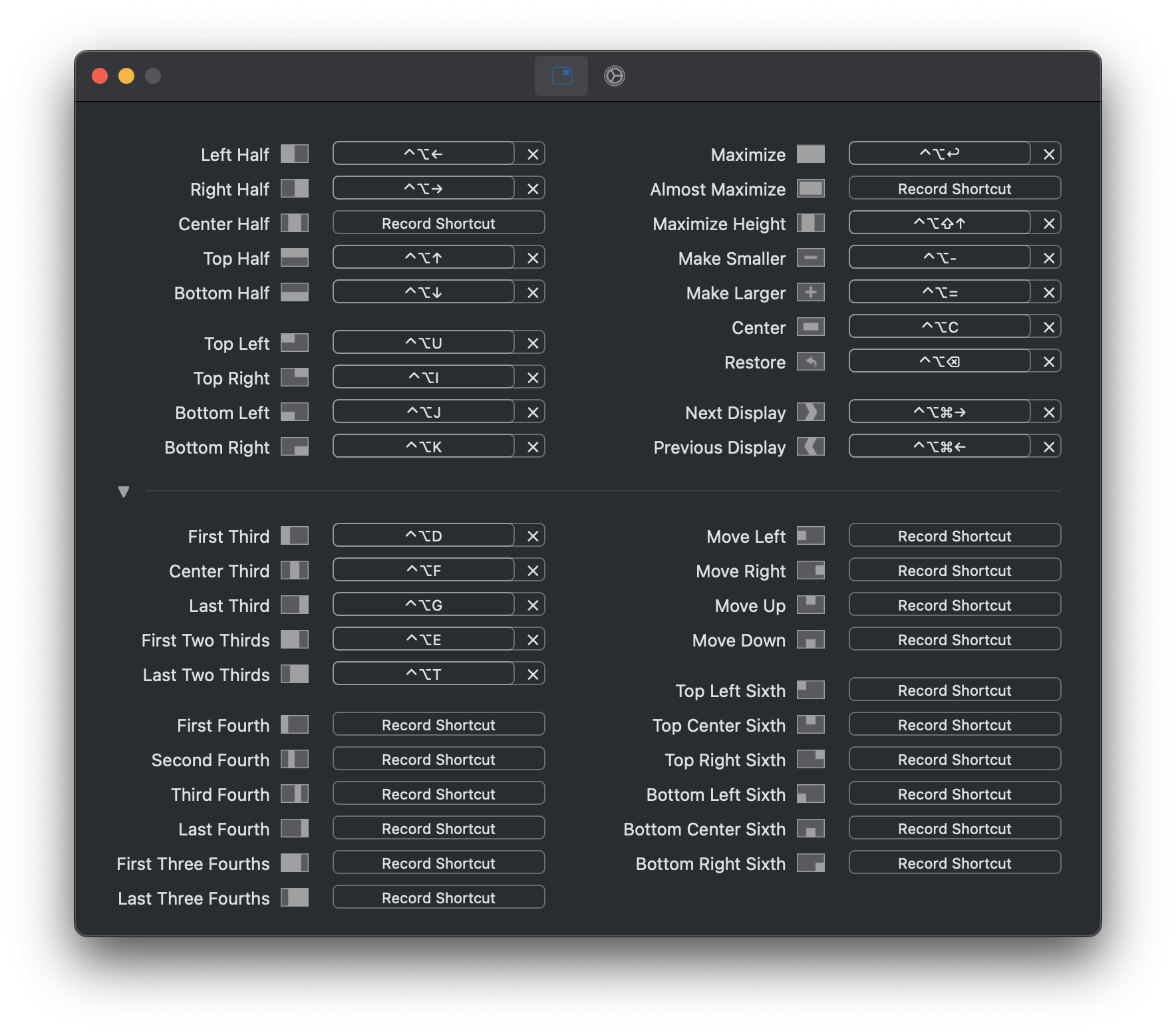 |
iTerms2,zsh,oh-my-zsh,Fig:命令行相关 见下面 ⤵
一些体会
- List of useful Quick Look plugins for developers
- Paralles:Windows 对 MBP 的 Retina 的支持不好,DPI 不可以超过 185%,参见 Resize Search Box and Address Box Win7
- Paralles:在 Windows 里删除 shared folder 里的文件(非挂靠在 Windows 的硬盘),不会进入 Windows 回收站
- Moom 的快捷窗口操作(Rectangle 取代)
- Aflred/Raycast 据说是个神器,spotlight+,可迅速定制各种任务的快捷方式,目前没有太过复杂的操作,我并没有使用。
- Apple 会把 TNT 的证书删除,碰到软件打不开的问题,需要自行重新签发证书:
> codesign --force --deep --sign - /Applications/xxx.app
常用软件 #
| 常用软件 |
|---|
| Beyond Compare:文件/文件夹对比神器 |
| Boom3D:音效加强 |
| CleanShot X:截屏 |
| Dash:编程文档 |
| Downie:各种视频下载,支持优酷、腾讯视频、bilibili、土豆、爱奇艺、网易、搜狐、微博以及国外的 Youtube 等等 |
| Find My:跟踪 Apple 设备,防止遗失 |
| GoodNote:手写体笔记 |
| Klack:模拟机械键盘的敲击声,超酷 |
| Movist Pro:Mac 上最好的 movie 播放器 |
| PopClip:Copy/Paste 剪贴板工具 |
| Reeder:rss 订阅 |
| Screenshot ,Shottr :截图 |
| Omi,Clevershot X,ScreenFlow,剪映:录屏,视频剪辑 |
其它常用软件:
- Chrome 及一堆插件 ⤵(Goolge 同步)
- Windows Office for Mac
- 各种网盘软件:百度网盘、Dropbox、Google Drive 等
- 微信 Wechat,Whatsapp,Telegram,Twitter,Discord,Slack,Zoom,Teams 等一众社交软件
Chrome 插件 #
| 普通插件 | 介绍 |
|---|---|
| AI 课代表 | 视频总结, 字幕列表, GPT-4 |
| AdGuard AdBlocker - Chrome Web Store | 广告去除 |
| Awesome ChatGPT Screenshot & Screen Recorder | 截图和屏幕录制 |
| Better History | |
| ChatGPT for Google | |
| ChatGPT for StackOverflow | |
| ChatGPT Glarity | 利用 ChatGPT4 生成摘要,支持 Youtube 视频和谷歌 |
| Clear Cache | |
| Clutter Free | 禁重复 tab |
| Control Panel for Twitter | 支持多个 Twitter 账号切换 |
| Copy Link Text | |
| Copy Title and Url as Markdown Style | |
| Grammarly | 语法检查 |
| Modern for Hacker News - Chrome Web Store | |
| I don’t care about cookies | |
| Immersive Translate: Web Page&PDF Translation - Chrome Web Store | 网页对照翻译 |
| SimpleUndoClose | Undo closed tabs |
| Toby for Chrome | 默认标签页,收集和快速打开常用网站 |
| YouTube™ dual subtitles | 双语字幕,字幕下载 |
| Youtube 中文配音 | |
开发工具 #
JetBrain 的全家桶 IntelliJ,Pycharm,WebStorm,Goland,DataGrip 是我十多年来开发 Java 和其它语种的主力 IDE,各种文本编辑基本已归置 VS Code。以前 Windows 上经常画图的工具是 Visio,现在转到 draw.io 和 Excalidraw eraser.io。Git 命令行基本够用,偶尔看看 Gitkraken 神器 Modules-Learn/技术/Gitkraken 最新版 v9.x 破解教程.md at master · wanZzz6/Modules-Learn。
vi/vim 我是半吊子,非常有空才打算深入。
VPN #
七款 VPN 比较
| VPN 名称 | 注册 | 可连接国家 | 限速 | 用量 | 使用设备 | 广告 | P2P |
|---|---|---|---|---|---|---|---|
| AtlasVPN | 不要 | 3 | 🈶️ | 无限制 | 1 | 🈚️ | 是 |
| Hotspot Shield | 不要 | 1 | 🈶️ | 500MB/天 | 1 | 🈶️ | 是 |
| PrivadoVPN | 要 | 12 | 🈚️ | 10GB/月 | 1 | 🈚️ | 是 |
| ProtonVPN | 要 | 3 | 🈶️ | 无限制 | 1 | 🈚️ | 否 |
| Speedify | 不要 | 几乎全部 | 🈚️ | 1GB/月 | 1 | 🈚️ | 否 |
| TunnelBear | 要 | 23 | 🈚️ | 500MB/天 | 1 | 🈚️ | 是 |
| Windscribe | 要 | 10 | 🈶️ | 10GB/月 | 1 | 🈚️ | 否 |
命令行 #
命令行各种配置的保留,参考之前的文章: dotfiles - 你肯定知道这个东西是什么,不然就不要往下看了
| 命令行大件 | |
|---|---|
| iTerm2 | 比 Mac 自带的 terminal 强,颜色 aura-theme-soft,字体 Hack Nerd Font,命令行提示 starship,窗体,快键唤出等等,自行安装和设置。另外可以配合 tmux 多窗口管理器使用 |
| homebrew | Mac 软件安装管理必备神器,相当于 Linux 上的 yum,装完后一通 brew install |
| zsh | 增强型 bash, oh-my-zsh OMZ 是个 zsh 的集成者 |
| Fig | 命令行自动补全神器 |
iTerm2 #
selection 设置 #

session 恢复 #
1. system preferences - general: |
2. iTerm2 - settings - General: |
3.  |
命令行提示 starship #
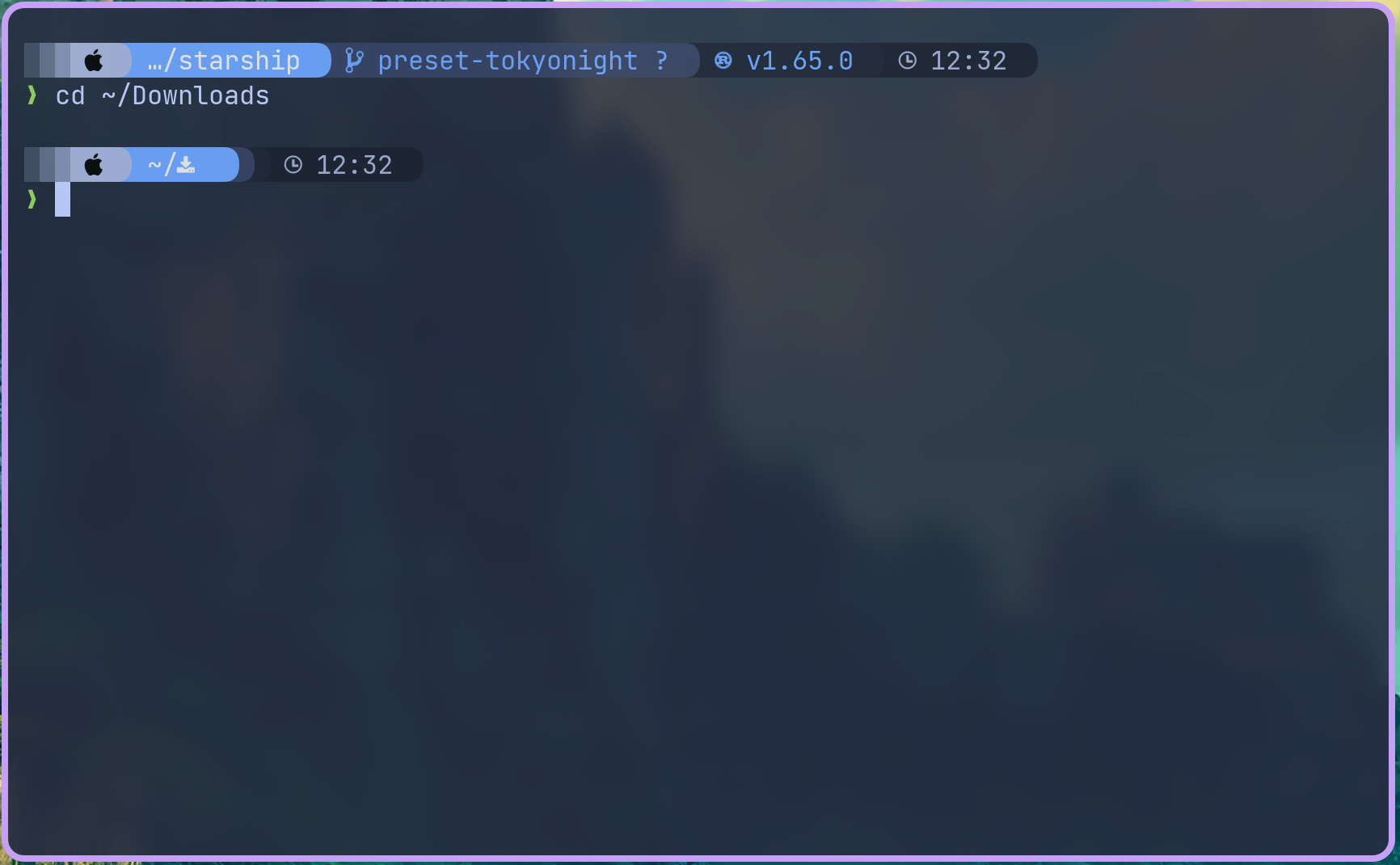
Starship: Cross-Shell Prompt,我挺喜欢 Tokyo-night:
iTerm2 其它技巧 #
- iTerm2 → Install Shell Integration
- iTerm2 允许我们快速查看剪贴板内容 只需使用 ⌘ ⇧ H 可以呼出粘贴历史
- 在 iTerm2 中,双击选中,三击选中整行,四击智能选中(智能规则可配置)
- 按住 ⌘ 键:可以拖拽选中的字符串
- 点击 url:调用默认浏览器访问该网址;
- 点击文件:调用默认程序打开文件;
- 点击文件夹:在 finder 中打开该文件夹;
- 同时按住 ⌥ 键,可以以矩形选中,类似于 Vim 中的 ⌃ V 操作
- 将文本内容复制到剪切板
- 在 Finder 中打开当前目录
iTerms 备份和恢复 #
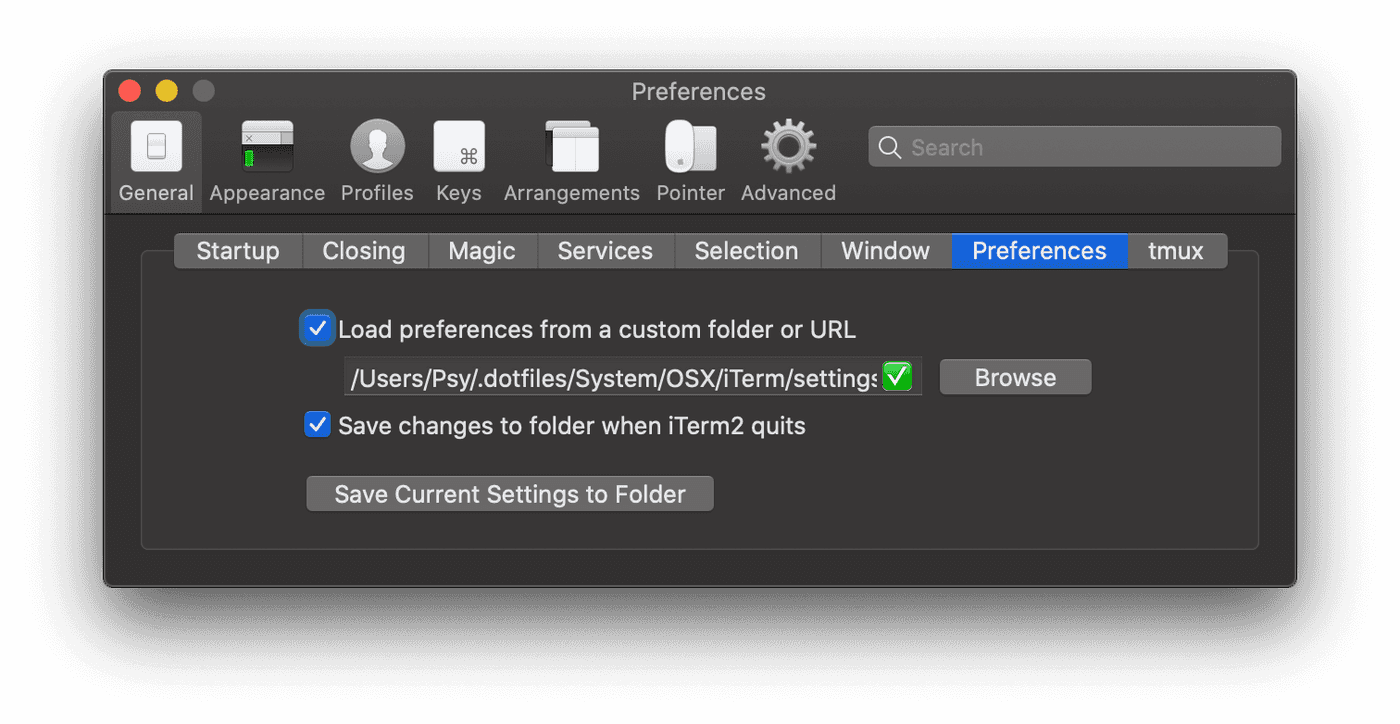
iTerms2 的设置可以保存到文件里,然后从备份文件里恢复:
tmux #
brew 和 命令行工具 #
brew 的备份和恢复 #
brew 可以通过 brew bundle 进行备份 Brewfile,然后一键在另外一台机器上恢复,Brewfile 和通常的 brew 略有不同:
| 命令行 | Brewfile |
|---|---|
| brew install [formulaName] | brew “[forumlaName]” |
| brew cask install [caskName] | cask “[caskName]” |
| mas install [identifier] | mas “[bundleIdentifier]”, id: [identifier] |
恢复/安装:
$ brew bundle
增强型命令行工具 #
| A list of new(ish) command line tools |
|---|
| ag 搜索工具,类似 ack |
| asciinema 可以录制 terminal |
| bat 增加语法高亮,取代 cat |
| broot 取代 tree |
| choose 结合 cut 和 awk 功能 |
| curlie 简化 curl |
| dust 取代 du |
| eza 取代 find |
| fd 取代 find |
| fig 超强命令行自动补全,神器 |
| fzf 文件模糊搜索 |
| gping 取代 ping |
| hyperfine benchmark/测速工具 |
| htop 取代 top |
| httpie 命令行 http |
| jq json 文件浏览、格式化、支持高亮 |
| procs 显示 PID 和 TCP 端口,取代 ps |
| psgrep 树型方式显示进程 |
| ripgrep 和 grep 类似但遵循 gitignore |
| sd 取代 sed |
| shellcheck shell script 语法检查 |
| thefuck |
| tldr 取代 man |
| xh 与 httpie 简洁界面类似,但速度更快 |
| xz 压缩工具 |
增强型命令行工具
ag 搜索工具,类似 ack,但更快

asciinema 可以录制 terminal

bat 增加语法高亮,取代 cat

broot 取代 tree

choose 结合 cut 和 awk 功能

curlie 简化 curl

dust Rust 开发,取代 du

eza 取代 ls

fd 更快,更友好,取代 find

fig 命令行自动补全,神器

fzf 文件模糊搜索,参考 Vim universe. fzf - command line fuzzy finder

gping 取代 ping

hyperfine benchmark/测速工具

httpie 命令行 http,类似 wget,curl

jq json 文件浏览、格式化、支持高亮,有一点学习曲线,看参考 jq cheetsheet 和来自 文档的一些使用技巧

procs 显示 PID 和 TCP 端口,取代 ps,用 Rust 开发

ripgrep 更快,更友好,和 grep 类似但遵循 gitignore

sd 取代 sed

shellcheck shell script 语法检查

thefuck 神器

tldr 取代 man

xh 与 httpie 简洁界面类似,但速度更快

xz 压缩工具
zsh #
plugins #
zsh 的插件很多,自行选择 awesome-zsh-plugins:
zsh-syntax-highlighting |
zsh-history-substring-search |
alias #
alias 列表
# =============================================================================
# ZSH CONFIGURATION
# Description: Optimized Zsh configuration for development environment
# File: ~/.zshrc
# =============================================================================

# Skip loading if not interactive shell
[[ $- != *i* ]] && return

# Disable slow security checks for faster startup
export ZSH_DISABLE_COMPFIX=true

# Homebrew environment (dynamic detection)
if [[ -x "/opt/homebrew/bin/brew" ]]; then
    # Apple Silicon Mac
    eval "$(/opt/homebrew/bin/brew shellenv)"
elif [[ -x "/usr/local/bin/brew" ]]; then
    # Intel Mac
    eval "$(/usr/local/bin/brew shellenv)"
fi

### ----------
### Zsh plugin
### ----------

# zsh-autosuggestions (load with fallback)
if [[ -f "/opt/homebrew/share/zsh-autosuggestions/zsh-autosuggestions.zsh" ]]; then
    source /opt/homebrew/share/zsh-autosuggestions/zsh-autosuggestions.zsh
elif [[ -f "/usr/local/share/zsh-autosuggestions/zsh-autosuggestions.zsh" ]]; then
    source /usr/local/share/zsh-autosuggestions/zsh-autosuggestions.zsh
fi

# zsh-syntax-highlighting (load with fallback)
if [[ -f "/opt/homebrew/share/zsh-syntax-highlighting/zsh-syntax-highlighting.zsh" ]]; then
    source /opt/homebrew/share/zsh-syntax-highlighting/zsh-syntax-highlighting.zsh
elif [[ -f "/usr/local/share/zsh-syntax-highlighting/zsh-syntax-highlighting.zsh" ]]; then
    source /usr/local/share/zsh-syntax-highlighting/zsh-syntax-highlighting.zsh
fi

# zsh-history-substring-search (load with fallback)
if [[ -f "/opt/homebrew/share/zsh-history-substring-search/zsh-history-substring-search.zsh" ]]; then
    source /opt/homebrew/share/zsh-history-substring-search/zsh-history-substring-search.zsh
elif [[ -f "/usr/local/share/zsh-history-substring-search/zsh-history-substring-search.zsh" ]]; then
    source /usr/local/share/zsh-history-substring-search/zsh-history-substring-search.zsh
fi

### -------
### Options
### -------

set ZSH_ALIAS_FINDER_AUTOMATIC=true

# History & Completion
HISTDUP=erase
export HISTORY_IGNORE="(ls|pwd|cd|exit|clear|history)*"
HISTSIZE=10000
SAVEHIST=10000
export HSTR_CONFIG=hicolor  # get more colors

# History Options
setopt ALWAYS_TO_END        # move cursor to end if word had one match
setopt APPEND_HISTORY       # allow multiple terminal sessions to all append to one zsh command history
setopt AUTO_CD              # cd by typing directory name if it's not a command
setopt AUTO_LIST            # automatically list choices on ambiguous completion
setopt AUTO_MENU            # automatically use menu completion
setopt COMPLETE_IN_WORD     # needed for prefix completer
setopt CORRECT_ALL          # autocorrect commands
setopt EXTENDED_HISTORY     # include more information about when the command was executed, etc
setopt HIST_IGNORE_ALL_DUPS # delete an old recorded event if a new event is a duplicate.
setopt HIST_IGNORE_DUPS     # do not record an event that was just recorded again.
setopt HIST_NO_STORE        # don't store history commands
setopt HIST_REDUCE_BLANKS   # remove extra blanks from each command line being added to history
setopt HIST_SAVE_NO_DUPS    # do not write a duplicate event to the history file.
setopt histignorespace      # skip cmds w/ leading space from history
setopt INC_APPEND_HISTORY   # add comamnds as they are typed, don't wait until shell exit
setopt SHARE_HISTORY        # share history between all sessions.

# Correction and completion
setopt CORRECT                  # Autocorrect commands (not CORRECT_ALL to avoid aggressive correction)
setopt NO_CASE_GLOB             # Case insensitive globbing
setopt NUMERIC_GLOB_SORT        # Sort numeric filenames numerically

# Job control
setopt AUTO_RESUME              # Resume jobs with their name
setopt LONG_LIST_JOBS           # List jobs in long format
setopt NOTIFY                   # Report status of background jobs immediately


### -----------------
### COMPLETION SYSTEM
### -----------------

# Initialize completion system
autoload -Uz compinit
# Check if compinit needs to be regenerated (once per day)
if [[ -n ${ZDOTDIR:-$HOME}/.zcompdump(#qN.mh+24) ]]; then
    compinit
else
    compinit -C  # Skip security check for faster startup
fi

# Completion styles
zstyle ':completion:*' menu select                                    # Select completions with arrow keys
zstyle ':completion:*' group-name ''                                  # Group results by category
zstyle ':completion:*' list-colors ${(s.:.)LS_COLORS}                # Use LS_COLORS for completion
zstyle ':completion:*:descriptions' format '%F{yellow}-- %d --%f'     # Format group descriptions
zstyle ':completion:*:warnings' format '%F{red}-- No matches found --%f'
zstyle ':completion:*' completer _expand _complete _ignored _approximate
zstyle ':completion:*' matcher-list 'm:{a-zA-Z}={A-Za-z}'            # Case insensitive matching
zstyle ':completion:*' rehash true                                    # Automatically find new executables in path


### -------
### bindkey
### -------

# History search
bindkey '^R' history-incremental-search-backward
bindkey '^[[A' history-substring-search-up      # Up arrow
bindkey '^[[B' history-substring-search-down    # Down arrow

# HSTR integration
if command -v hstr >/dev/null 2>&1; then
    bindkey -s "\C-r" "\C-a hstr -- \C-j"       # Bind hstr to Ctrl-r
fi

# Line editing
bindkey '^A' beginning-of-line                   # Ctrl+A
bindkey '^E' end-of-line                         # Ctrl+E
bindkey '^K' kill-line                           # Ctrl+K
bindkey '^U' backward-kill-line                  # Ctrl+U
bindkey '^W' backward-kill-word                  # Ctrl+W

# Enable Vi mode (uncomment if preferred)
# bindkey -v

# User configuration

### ---------------------
### ENVIRONMENT VARIABLES
### ---------------------

# export MANPATH="/usr/local/man:$MANPATH"

# You may need to manually set your language environment
export LANG=en_US.UTF-8
export LC_ALL=en_US.UTF-8

# Editor configuration
if [[ -n $SSH_CONNECTION ]]; then
    export EDITOR='vim'
    export VISUAL='vim'
else
    export EDITOR='code --wait'
    export VISUAL='code --wait'
fi

# Pager
export PAGER='less'
export LESS='-R -F -X -M'

# Development environment
export DEVELOPMENT_MODE=true

# Compilation flags
# export ARCHFLAGS="-arch x86_64"
# export LDFLAGS="-L/usr/local/opt/luajit-openresty/lib"
# export CPPFLAGS="-I/usr/local/opt/luajit-openresty/include"

### -----
### Path
### -----

# Function to safely add to PATH
add_to_path() {
    local dir="$1"
    if [[ -d "$dir" && ":$PATH:" != *":$dir:"* ]]; then
        export PATH="$dir:$PATH"
    fi
}

# Add development tools to PATH
add_to_path "/usr/local/opt/icu4c/bin"
add_to_path "/usr/local/opt/icu4c/sbin"
add_to_path "/usr/local/opt/ruby/bin"
add_to_path "$HOME/.local/bin"
add_to_path "$HOME/bin"

### -----
### Conda
### -----

# Lazy loading conda for faster shell startup
lazy_load_conda() {
    __conda_setup="$('/Users/zhonglun/anaconda3/bin/conda' 'shell.zsh' 'hook' 2> /dev/null)"
    if [ $? -eq 0 ]; then
        eval "$__conda_setup"
        echo "🐍 Conda environment loaded"
        return 0
    fi
    echo "❌ Conda not found in common locations"
    return 1
}

conda_status() {
    if command -v conda >/dev/null 2>&1; then
        echo "🐍 Conda: Loaded and ready"
        return 0
    else
        echo "❌ Conda: Not available"
        echo "💡 Use 'conda0' to initialize"
        return 1
    fi
}

# Enhanced conda aliases
alias conda0=lazy_load_conda
alias condaenvs="conda env list"
alias condainfo="conda_status && conda info"
alias condaclr="conda clean --all"
alias condals="conda list"
alias condasearch="conda search"
alias condaupd="conda update conda && conda update anaconda && conda update --all && conda clean --all"


### -----
### Tools
### -----

# Autojump (with fallback paths)
if [[ -f "/opt/homebrew/etc/profile.d/autojump.sh" ]]; then
    source /opt/homebrew/etc/profile.d/autojump.sh
elif [[ -f "/usr/local/etc/profile.d/autojump.sh" ]]; then
    source /usr/local/etc/profile.d/autojump.sh
fi

# iTerm2 integration
if [[ -f "${HOME}/.iterm2_shell_integration.zsh" ]]; then
    source "${HOME}/.iterm2_shell_integration.zsh"
fi

# Starship prompt (with fallback)
if command -v starship >/dev/null 2>&1; then
    eval "$(starship init zsh)"
else
    # Simple fallback prompt
    PS1='%F{cyan}%n@%m%f:%F{yellow}%~%f$ '
fi


### -----
### Alias
### -----

# Source homebrew aliases: b
[ -f ~/.aliases/homebrew.sh ] && source ~/.aliases/homebrew.sh

# Source common tools aliases: Cat, Echo, List, Find, Ssh, q/x, Zsh, History, etc.
[ -f ~/.aliases/common.sh ] && source ~/.aliases/common.sh

# Source tools aliases
[ -f ~/.aliases/tools.sh ] && source ~/.aliases/tools.sh

# Source git aliases: g
[ -f ~/.aliases/git.sh ] && source ~/.aliases/git.sh

# Source java and jvm aliases: jv
[ -f ~/.aliases/java.sh ] && source ~/.aliases/java.sh

# Source javascript aliases: n - npm
[ -f ~/.aliases/js.sh ] && source ~/.aliases/js.sh

# Source python aliases: py
[ -f ~/.aliases/python.sh ] && source ~/.aliases/python.sh

# Source go aliases: go
[ -f ~/.aliases/go.sh ] && source ~/.aliases/go.sh

# Source rust aliases: rust
[ -f ~/.aliases/rust.sh ] && source ~/.aliases/rust.sh

# Source ruby aliases: rb
[ -f ~/.aliases/ruby.sh ] && source ~/.aliases/ruby.sh

# Source lua aliases: lua
[ -f ~/.aliases/lua.sh ] && source ~/.aliases/lua.sh

# Source projects aliases
[ -f ~/.aliases/projects.sh ] && source ~/.aliases/projects.sh


# Function to display development environment info for different languages
f_devinfo() {
    local language="$1"
    YELLOW='\033[1;33m'
    NC='\033[0m' # No Color

    if [[ -z "$language" ]]; then
        echo "🔧 DEVELOPMENT ENVIRONMENTS"
        echo "============================"
        echo
        echo "Available info commands:"
        echo -e "  ${YELLOW}devinfo${NC}     → Show all environments"
        echo -e "  ${YELLOW}devgo    ${NC}   → Go environment info"
        echo -e "  ${YELLOW}devjava  ${NC}   → Java, Maven, Gradle info"
        echo -e "  ${YELLOW}devjs    ${NC}   → Node.js and npm info"
        echo -e "  ${YELLOW}devkotlin${NC}   → Kotlin environment info"
        echo -e "  ${YELLOW}devlua   ${NC}   → Lua environment info"
        echo -e "  ${YELLOW}devpython${NC}   → Python environment info"
        echo -e "  ${YELLOW}devruby  ${NC}   → Ruby and gems info"
        echo -e "  ${YELLOW}devrust  ${NC}   → Rust and Cargo info"
        echo -e "  ${YELLOW}devscala ${NC}   → Scala and SBT info"
        echo
        return
    fi

    case "$language" in
        "java")
            if command -v javainfo >/dev/null 2>&1; then
                javainfo
            else
                echo "❌ javainfo function not available"
            fi
            ;;
        "kotlin")
            if command -v kotlininfo >/dev/null 2>&1; then
                kotlininfo
            else
                echo "❌ kotlininfo function not available"
            fi
            ;;
        "scala")
            if command -v scalainfo >/dev/null 2>&1; then
                scalainfo
            else
                echo "❌ scalainfo function not available"
            fi
            ;;
        "python"|"py")
            if command -v pyinfo >/dev/null 2>&1; then
                pyinfo
            else
                echo "❌ pyinfo function not available"
            fi
            ;;
        "rust")
            if command -v rustinfo >/dev/null 2>&1; then
                rustinfo
            else
                echo "❌ rustinfo function not available"
            fi
            ;;
        "go")
            if command -v goinfo >/dev/null 2>&1; then
                goinfo
            else
                echo "❌ goinfo function not available"
            fi
            ;;
        "js"|"javascript"|"node")
            if command -v jsinfo >/dev/null 2>&1; then
                jsinfo
            elif command -v nodeinfo >/dev/null 2>&1; then
                nodeinfo
            else
                echo "❌ jsinfo/nodeinfo function not available"
            fi
            ;;
        "ruby"|"rb")
            if command -v rubyinfo >/dev/null 2>&1; then
                rubyinfo
            else
                echo "❌ rubyinfo function not available"
            fi
            ;;
        "lua")
            if command -v luainfo >/dev/null 2>&1; then
                luainfo
            else
                echo "❌ luainfo function not available"
            fi
            ;;
        "all")
            echo "🌍 ALL DEVELOPMENT ENVIRONMENTS"
            echo "==============================="
            echo

            for lang in java kotlin scala python rust go js ruby lua; do
                f_devinfo "$lang"
                echo
            done
            ;;
        *)
            echo "❌ Unknown language: $language"
            echo
            echo "Available: java, kotlin, scala, python, rust, go, js, ruby, lua, all"  | lolcat
            ;;
    esac
}

# Function to display available aks* and dev* shortcuts
f_aliases_help() {
    local category="$1"
    YELLOW='\033[1;33m'
    NC='\033[0m' # No Color

    case "$category" in
        "aks")
            echo "📋 ALIAS SHORTCUTS (aks*)"
            echo "========================="
            echo
            echo "General:"
            echo -e "  ${YELLOW}aksls  ${NC}    → Show all aliases"
            echo -e "  ${YELLOW}aksfind${NC}    → Search for aliases"
            echo
            echo "Language-specific aliases:"
            echo -e "  ${YELLOW}aksbrew  ${NC}  → Homebrew aliases"
            echo -e "  ${YELLOW}akscommon${NC}  → Common tools aliases"
            echo -e "  ${YELLOW}aksdevops${NC}  → Devops tools aliases"
            echo -e "  ${YELLOW}aksgit   ${NC}  → Git aliases"
            echo -e "  ${YELLOW}aksjava  ${NC}  → Java/Maven/Gradle aliases"
            echo -e "  ${YELLOW}aksjs    ${NC}  → JavaScript/Node aliases"
            echo -e "  ${YELLOW}akspy    ${NC}  → Python aliases"
            echo -e "  ${YELLOW}aksrust  ${NC}  → Rust/Cargo aliases"
            echo -e "  ${YELLOW}aksgo    ${NC}  → Go aliases"
            echo -e "  ${YELLOW}aksruby  ${NC}  → Ruby/Gem aliases"
            echo -e "  ${YELLOW}akslua   ${NC}  → Lua aliases"
            echo -e "  ${YELLOW}akstools ${NC}  → Development tools aliases"
            echo -e "  ${YELLOW}aksproj  ${NC}  → Project-specific aliases"
            ;;
        "dev")
            echo "🔧 DEVELOPMENT INFO SHORTCUTS (dev*)"
            echo "====================================="
            echo
            echo "Individual environments:"
            echo -e "  ${YELLOW}devjava  ${NC}  → Java/Maven/Gradle info"
            echo -e "  ${YELLOW}devkotlin${NC}  → Kotlin environment info"
            echo -e "  ${YELLOW}devscala ${NC}  → Scala/SBT info"
            echo -e "  ${YELLOW}devpython${NC}  → Python environment info"
            echo -e "  ${YELLOW}devrust  ${NC}  → Rust/Cargo info"
            echo -e "  ${YELLOW}devgo    ${NC}  → Go environment info"
            echo -e "  ${YELLOW}devjs    ${NC}  → Node.js/npm info"
            echo -e "  ${YELLOW}devruby  ${NC}  → Ruby/Gem info"
            echo -e "  ${YELLOW}devlua   ${NC}  → Lua environment info"
            echo
            echo "Special commands:"
            echo -e "  ${YELLOW}devinfo${NC}     → Show ALL environments"
            ;;
        "")
            echo "🚀 DEVELOPMENT SHORTCUTS REFERENCE"
            echo "=================================="
            echo
            f_shortcuts_help "aks"
            echo
            f_shortcuts_help "dev"
            echo
            echo "💡 Usage Tips:"
            echo "  • Use 'aksfind <term>' to search for specific aliases" | lolcat
            echo "  • Use 'devinfo' to see all development environments at once"  | lolcat
            ;;
        *)
            echo "❌ Unknown category: $category"
            echo
            echo "Available categories:"
            echo "  aks    → Show aks alias shortcuts"  | lolcat
            echo "  dev    → Show development info shortcuts"  | lolcat
            ;;
    esac
}


# Function to display aliases from specific files or all files
f_aliases_show() {
    local category="$1"
    local aliases_dir="$HOME/.aliases"

    # Color codes for better readability
    local BLUE='\033[0;34m'
    local GREEN='\033[0;32m'
    local YELLOW='\033[1;33m'
    local RED='\033[0;31m'
    local NC='\033[0m' # No Color

    # Function to extract and display aliases from a file
    show_file_aliases() {
        local file="$1"
        local filename=$(basename "$file" .sh)

        if [[ -f "$file" ]]; then
            echo
            echo -e "${BLUE}=== $(echo ${filename} | tr '[:lower:]' '[:upper:]') ALIASES ===${NC}"

            # Extract aliases and functions, skip comments and empty lines
            grep -E "^(alias |function |.*\(\))" "$file" | \
            grep -v "^#" | \
            while IFS= read -r line; do
                if [[ "$line" =~ ^alias ]]; then
                    # Extract alias name and command
                    local alias_part="${line#alias }"
                    local alias_name="${alias_part%%=*}"
                    local alias_cmd="${alias_part#*=}"
                    # Remove quotes from command
                    alias_cmd="${alias_cmd%\"}"
                    alias_cmd="${alias_cmd#\"}"
                    alias_cmd="${alias_cmd%\'}"
                    alias_cmd="${alias_cmd#\'}"

                    echo -e "  ${GREEN}${alias_name}${NC} → ${YELLOW}${alias_cmd}${NC}"
                elif [[ "$line" =~ \(\) ]] || [[ "$line" =~ ^function ]]; then
                    # Extract function name
                    local func_name
                    if [[ "$line" =~ ^function ]]; then
                        func_name="${line#function }"
                        func_name="${func_name%%\(*}"
                    else
                        func_name="${line%%\(*}"
                    fi
                    echo -e "  ${GREEN}${func_name}${NC} → ${RED}[function]${NC}"
                fi
            done
            echo
        else
            echo -e "${RED}File not found: $file${NC}"
            echo
        fi
    }

    if [[ -z "$category" ]]; then
        # Show all aliases if no category specified
        echo
        echo -e "${YELLOW}📋 ALL ALIASES AND FUNCTIONS${NC}"
        echo "================================"
        echo

        # List all .sh files in aliases directory
        for file in "$aliases_dir"/*.sh; do
            if [[ -f "$file" ]]; then
                show_file_aliases "$file"
            fi
        done
    else
        # Show specific category
        local file="$aliases_dir/${category}.sh"
        echo
        show_file_aliases "$file"
    fi
}

# Function to search for aliases across all files
f_aliases_find() {
    local search_term="$1"
    local aliases_dir="$HOME/.aliases"

    if [[ -z "$search_term" ]]; then
        echo "Usage: f_aliases_find <search_term>"
        echo "Example: f_aliases_find git"
        return 1
    fi

    echo
    echo "🔍 SEARCHING FOR: $search_term"
    echo "================================"
    echo

    local found=false

    # Search in all .sh files in aliases directory
    for file in "$aliases_dir"/*.sh; do
        if [[ -f "$file" ]]; then
            local filename=$(basename "$file" .sh)

            # Search for aliases and functions containing the search term
            local matches=$(grep -n -E "^(alias |function |.*\(\))" "$file" 2>/dev/null | grep -i "$search_term" 2>/dev/null)

            if [[ -n "$matches" ]]; then
                found=true
                echo "📁 Found in ${filename}.sh:"

                while IFS= read -r match; do
                    if [[ -n "$match" ]]; then
                        local line_num="${match%%:*}"
                        local line_content="${match#*:}"

                        if [[ "$line_content" =~ ^alias ]]; then
                            # Parse alias
                            local alias_part="${line_content#alias }"
                            local alias_name="${alias_part%%=*}"
                            local alias_cmd="${alias_part#*=}"
                            # Remove quotes
                            alias_cmd="${alias_cmd%\"}"
                            alias_cmd="${alias_cmd#\"}"
                            alias_cmd="${alias_cmd%\'}"
                            alias_cmd="${alias_cmd#\'}"

                            echo "  $alias_name → $alias_cmd (line $line_num)"
                        elif [[ "$line_content" =~ \(\) ]] || [[ "$line_content" =~ ^function ]]; then
                            # Parse function
                            local func_name
                            if [[ "$line_content" =~ ^function ]]; then
                                func_name="${line_content#function }"
                                func_name="${func_name%%\(*}"
                            else
                                func_name="${line_content%%\(*}"
                            fi

                            echo "  $func_name → [function] (line $line_num)"
                        fi
                    fi
                done <<< "$matches"
                echo
            fi
        fi
    done

    if [[ "$found" == false ]]; then
        echo "❌ No aliases or functions found matching: $search_term"
        echo
        echo "💡 Tip: Try a partial match or different spelling"  | lolcat
    fi
}

# Alias display shortcuts
alias aks="f_aliases_help aks"
alias akshelp="f_aliases_help aks"
alias aksls="f_aliases_show"
alias aksfind="f_aliases_find"
alias akscommon="f_aliases_show common"
alias aksgit="f_aliases_show git"
alias aksgo="f_aliases_show go"
alias aksbrew="f_aliases_show homebrew"
alias aksjava="f_aliases_show java"
alias aksjs="f_aliases_show js"
alias akslua="f_aliases_show lua"
alias aksproj="f_aliases_show projects"
alias akspy="f_aliases_show python"
alias aksruby="f_aliases_show ruby"
alias aksrust="f_aliases_show rust"
alias akstools="f_aliases_show tools"


alias dev="f_aliases_help dev"
alias devhelp="f_aliases_help dev"
alias devinfo="f_devinfo all"
alias devgo="f_devinfo go"
alias devjava="f_devinfo java"
alias devjs="f_devinfo js"
alias devkotlin="f_devinfo kotlin"
alias devlua="f_devinfo lua"
alias devpython="f_devinfo python"
alias devruby="f_devinfo ruby"
alias devrust="f_devinfo rust"
alias devscala="f_devinfo scala"
常用快捷键 #
MacOS 快捷键 #
| 宇宙通用 |
|---|
| ⌘ , ⌘ A ⌘ C ⌘ V ⌘ X ⌘ Z ⌘ R ⌘ F ⌘ N ⌘ ⇥ ⌘ ␣ ⌘ W ⌘ Q |
| 系统通用 |
|---|
| 窗口 |
| 新建窗口:⌘ N |
| 隐藏窗口:⌘ H |
| 最小化窗口:⌘ M |
| 关闭当前窗口:⌘ W |
| 在应用程序之间切换:⌘ ⇥ |
| 在单个应用程序的多个窗口之间切换:⌘ ~ |
| Show all windows of the front app: ⌃ ↓ |
| Show all windows: ⌃ ↑ |
| 编辑 |
| Forward delete: Fn del |
| Paste without formatting: ⇧ ⌘ V |
| 保存文件: ⌘ S |
| 另存文件: ⇧ ⌘ S |
| 退出: ⌘ Q |
| 强行退出: ⌥ ⌘ Esc |
| misc |
| Screenshot: ⇧ ⌘ 4 ␣(选择窗口)⇧ ⌘ 4 (选择区域)⇧ ⌘ 3(整个屏幕) |
| Finder |
|---|
| 打开 home folder: ⇧ ⌘ H |
| 打开 desktop folder: ⇧ ⌘ D |
| 打开文件、上级目录、下级目录:⌘O ⌘↑ ⌘↓ |
| 回到前一个目录: ⌘ [ |
| 转到下一个目录: ⌘ ] |
| 隐藏文件的开关: ⇧ ⌘ . |
iTerm2 快捷键 #
iTerm2 自带快捷键 #
| Function | Shortcut |
|---|---|
| New Tab | ⌘T |
| Close Tab or Window | ⌘ W same as many mac apps |
| Go to Tab | ⌘ Number ie: ⌘ 2 is 2nd Tab |
| Go to Split Pane by Direction | ⌘ ⌥ → ⌘ ⌥ ← |
| Cycle iTerm Windows | ⌘ ` true of all mac apps and works with desktops/mission control |
| Splitting | |
| Split Window Vertically (same profile) | ⌘ D |
| Split Window Horizontally (same profile) | ⌘ ⇧ D |
| Moving | |
| Move a pane with the mouse | ⌘ ⌥ ⇧ and then drag the pane from anywhere |
| Fullscreen | |
| Fullscreen | ⌘ Enter |
| Maximize a pane | ⌘ ⇧ Enter use with fullscreen to temp fullscreen a pane |
| Resize Pane | ⌃ ⌘ ↑ ⌃ ⌘ ↓ given you haven’t mapped this to something |
| Less Often Used By Me | |
| Go to Split Pane by Order of Use | ⌘ ] ⌘ [ |
| Split Window Horizontally (new profile) | ⌥ ⌘ H |
| Split Window Vertically (new profile) | ⌥ ⌘ V |
| Previous Tab | ⌘ ← |
| Next Tab | ⌘ → |
| Go to Window | ⌘ ⌥ Number |
iTerm2 自定义快捷键 #
如何自定义快捷键:

| 自定义快捷键 | 命令 | 发送 | 字符 |
|---|---|---|---|
| ⌥ ← | 左移一个单词 | Escape Sequence | b |
| ⌥ → | 右移一个单词 | Escape Sequence | f |
| ⌘ → | 移至行首 | Hex Codes | 0x01 |
| ⌘ ← | 移至行尾 | Hex Codes | 0x05 |
| ⌥ ⌫ | 删除至词首 | Hex Codes | 0x17 |
| ⌘ ⌫ | 删除整行 | Hex Codes | 0x15 |
| ⌘ Z | undo | Hex Codes | 0x1f |
采纳 vi 快捷键 #
注意如果使用 vi 快捷键,上述命令行快捷键就会失效。
把 bindkey -v 加到 .zshrc 里,命令行就可以使用 vi 的快捷键(bindkey -e 则是 emacs)。
命令行快捷键 #
| Function | Shortcut | Use |
|---|---|---|
| Delete to start of line | ⌃ U | Use this to start over typing without hitting ⌃ C |
| Delete to end of line | ⌃ K | Use this with command history to repeat commands and changing one thing at the end! |
| Repeat last command | ↑ ↓ | Cycle and browse your history with up and down. ⌃ R is faster if you know the string you are looking for. |
| Move back and forth on a line | ← → | This takes you off the home row but it’s easy to remember |
| Move back and forth on a line by words | ⌥ ← ⌥ → | Fast way to jump to a word to correct a typo or “run again” with minor changes |
| Delete previous word (in shell) | ⌃ W | It’s faster to delete by words. Especially when your last command was wrong by a single typo or something. |
| Clear screen | ⌃ L | This is telling the shell to do it instead of an explicit command like clear or cls in DOS. If you use ⌘ K, this is telling iTerm to clear the screen which might have the same result or do something terrible (like when using a TUI like top or htop. In general, use this instead of typing clear over and over. |
区别 ⌘ K ⌃ L
一个区别是 ⌘ K 清除回滚缓冲区以及屏幕。 ⌃ L 仅清除屏幕,有效地将屏幕上的内容“向上”移动到回滚缓冲区中。
另一个区别是 ⌃ L 是由终端内运行的进程执行的。例如,bash 将清除屏幕并重新绘制提示符,包括其中任何未完成的命令。其他程序可能继续刷新而不是先清除屏幕。另一方面, ⌘ K 由终端本身执行,无论窗口中运行什么,因此它可能会隐藏程序的输出。
vi 快捷键 #
快速移动 #
| Function | Shortcut |
|---|---|
| Move to the start of line | ⌃ A 或者 ⌃ Home |
| Move to the end of line | ⌃ E 或者 ⌃ End |
| Move forward a word | ⌥ F |
| Move backward a word | ⌥ B |
| Set Mark | ⌘ M |
| Jump to Mark | ⌘ J |
| Moving by word on a line (this is a shell thing but passes through fine) | ⌃ ← ⌃ → |
| Cursor Jump with Mouse (shell and vim - might depend on config) | ⌥ Left Click |
编辑 #
| Function | Shortcut |
|---|---|
| Enter Copy Mode | ⇧ ⌘ C |
| Enter Character Selection Mode in Copy Mode | ⌃ V |
| Move cursor in Copy Mode | H J K L vim motions or arrow keys |
| Copy text in Copy Mode | ⌃ K |
命令行历史 #
| Function | Shortcut |
|---|---|
| Search as you type | ⌃ R and type the search term; Repeat ⌃ R to loop through result |
| Search the last remembered search term | ⌃ R twice |
| End the search at current history entry | ⌃ Y |
| Cancel the search and restore original line | ⌃ G |
巨量资源 #
🛒 购买 MacRumors Buyer’s Guide:非常实用,购买苹果产品前必看
🛒 命令行
- awesome cli apps:A curated list of command line apps
- awesome shell:A curated list of awesome command-line frameworks,toolkits,guides and gizmos
- awesome-macos-command-line:收集了很多有趣的 Mac 终端命令
🛒 软件介绍
- 零度解说:各种免费资源,开车资源
- awesome-mac 软件大集合:收集各种类别非常好用的 Mac 应用程序、软件以及工具
🛒 软件下载